
What Causes Q-Switch Pulse Instability?
Unstable laser pulses can lead to inconsistent marking depth, uneven material processing, and reduced production efficiency. In Q-switched laser systems, pulse instability may manifest as pulse energy fluctuations, abnormal enhancement of the first pulse, inconsistent pulse timing, or changes in pulse width.
However, the problem may not always lie with the Q-switching device itself.
In acousto-optic Q-switching systems, the stability of the pulses depends on the combined effect of multiple factors, including RF (radio frequency) drive performance, trigger timing, thermal management, optical alignment, and component compatibility.
Here are five common causes of Q-switched pulse instability and their troubleshooting methods.
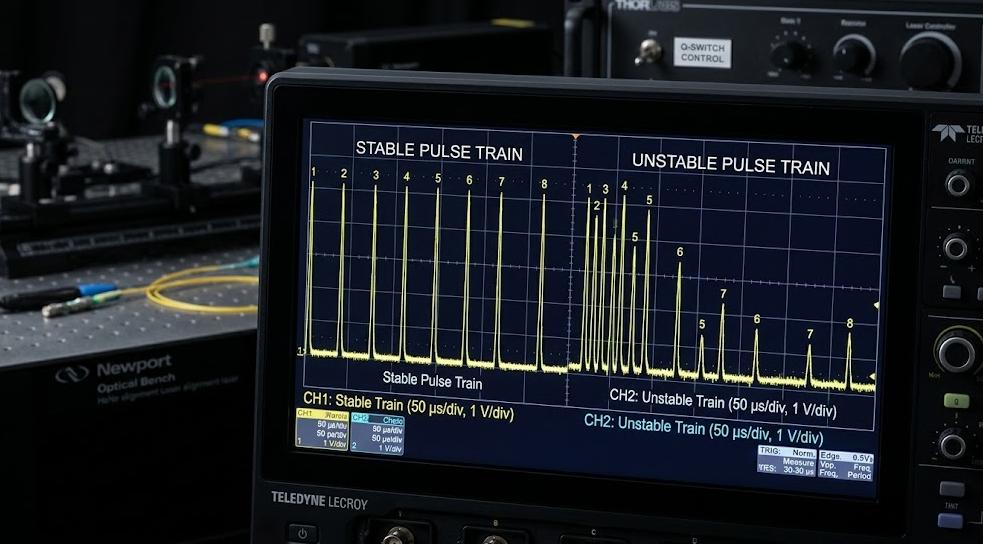
Unstable RF Drive Power or Frequency
The RF (Radio Frequency) driver is responsible for controlling the sound waves within the acousto-optic Q-switch. If the RF output fluctuates or deviates from the predetermined operating conditions, the diffraction efficiency may change, thereby affecting the characteristics of the laser pulse.
Common abnormal signs include:
- Fluctuations in pulse energy during continuous operation.
- Changes in laser output after system preheating.
- Changes in pulse performance after adjusting the RF power.
Check method: Monitor the RF output power and frequency under actual working conditions. Inspect the RF cable and connectors to confirm whether there is any loose or damaged connection. Verify the impedance matching between the driver and the Q-switch to minimize reflected power.
Avoid compensating for unstable output by simply increasing the RF power. Excessive drive power will increase thermal stress and may shorten the lifespan of components.
Incorrect Trigger Timing
The temporal error is another possible cause for the unstable performance of the Q-switching.
In an acousto-optic Q-switch, it takes a certain amount of time for the sound wave to be established within the crystal. If the RF (Radio Frequency) switch timing is not correctly synchronized with the laser pump period, the Q-switch may not reach the expected working state before the next pulse arrives.
This can lead to unstable pulse energy, irregular pulse timing, or the appearance of the first pulse with an intensity exceeding expectations after a pause.
Check method: Use an oscilloscope to compare the trigger signal, the RF drive waveform, and the related laser timing signals to confirm that the RF switch timing leaves sufficient time for the establishment of the sound wave.
For systems that generate an unusually strong first pulse, check whether the driver supports appropriate first-pulse suppression or pulse control functions.
Thermal Drift During Continuous Operation
If your laser performs well at startup but becomes unstable after a few minutes of operation, it may be caused by thermal drift.
RF power loss leads to heating of the Q-switch crystal and surrounding components. Temperature changes can affect the speed of sound, diffraction efficiency, and the operating point of the RF circuit.
This may result in a gradual drift in pulse energy or changes in output characteristics over a long production period.
Check method: Record the pulse energy and RF output data from startup to thermal equilibrium. Compare the results under different operating temperatures and repetition frequencies. Refer to the manufacturer’s specifications to check the cooling system, airflow conditions, and installation conditions.
If the performance recovers after cooling, before replacing the Q-switch crystal, it is necessary to investigate whether there is a thermal drift issue. Just relying on the surface temperature may not reflect the actual internal temperature of the crystal.
Optical Misalignment or Polarization Mismatch
Even if a properly sized Q-switch is used, the performance may still be poor if the optical system is not properly aligned.
In an acousto-optic Q-switch, the interaction between the laser beam and the sound wave depends on the required optical geometric layout. Improper alignment will reduce the diffraction efficiency and cause the device to fail to operate stably in switching.
Depending on the specific design of the Q-switch, polarization mismatch can also lead to performance degradation.
Typical symptoms include: output below expectations, increased optical loss, residual light leakage, and excessive sensitivity to minor alignment adjustments.
Check method: Compare the specifications of the Q-switch, verify the laser wavelength, beam position, polarization state, and alignment status. Check the required Bragg angle and confirm the correct position of the target diffraction beam.
Use appropriate methods to check if the optical surface is contaminated or damaged. When making alignment adjustments, always follow the manufacturer’s recommended operating conditions.
Q Switch and RF Driver Mismatch
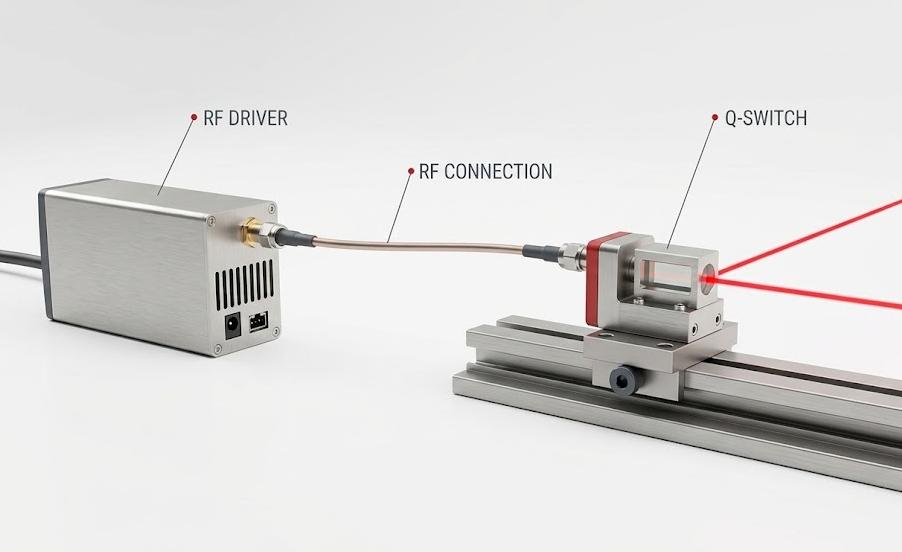
The Q-switch and its RF driver must work together as a compatible combination; merely matching the nominal RF frequency is not sufficient.
The driver must also provide appropriate RF power, electrical impedance, switching speed, and control interface for the selected device and laser application.
For example, if the driver cannot output the required RF power, it may result in failure to achieve the expected diffraction efficiency; impedance mismatch can cause power reflection, and improper switching characteristics may affect the timing and waveform of the pulse.
Component aging or damage may also cause similar problems, so the compatibility and the actual condition of the device need to be evaluated separately.
Check method: Compare the technical specifications of the Q-switch and the driver, verify the RF frequency, rated driving power, impedance, modulation requirements, and operating limits. If the system was previously operating normally, before deciding to replace it, one should first check if the RF output, connector condition, and thermal characteristics have changed.
For laser OEM manufacturers, evaluating the Q-switch and the driver as a whole helps shorten the integration time and prevent repeated unstable problems.
A Quick Troubleshooting Checklist
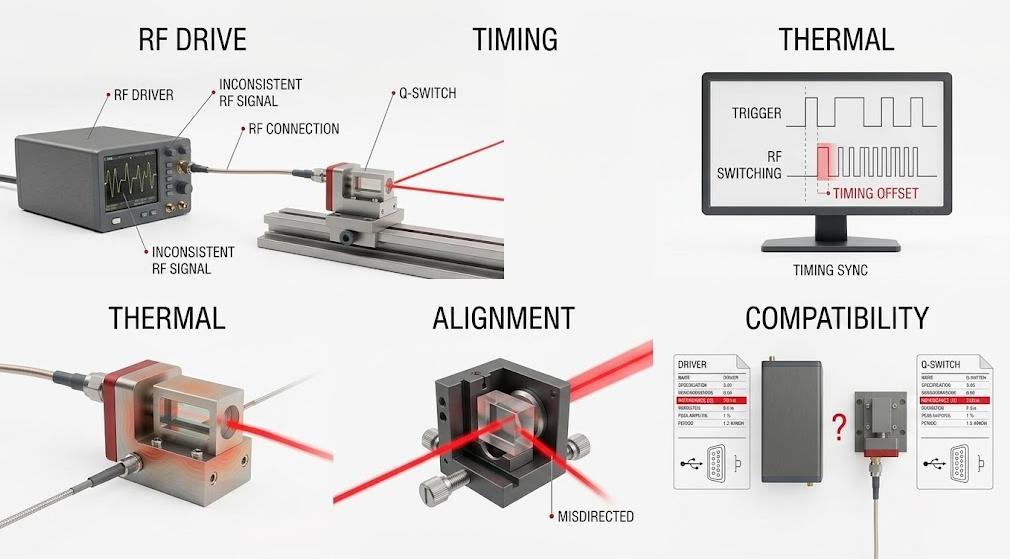
Before replacing any component, please follow these steps:
- Confirm the fault phenomenon. Determine whether the problem involves pulse energy, timing, pulse width, or the first pulse after the pause.
- Check the RF (Radio Frequency) drive. Measure the output stability and verify the frequency, power, and impedance matching.
- Review the timing sequence. Compare the trigger signal with the RF switching timing sequence.
- Monitor the temperature. Check for instability during the system’s temperature rise.
- Check the optical alignment. Verify the beam geometry, polarization state, and the cleanliness of the optical components.
- Verify the component compatibility. Before replacing the Q-switch or RF driver, compare their specification parameters first.
Change only one variable at a time and record the results. This makes it easier to identify the root cause and avoids masking the original fault by adjusting improperly and causing new problems.
Conclusion: Stable Pulses Start with the Right Match
The instability of the Q-switched pulse may stem from RF (Radio Frequency) drive fluctuations, improper timing settings, thermal drift, misalignment of the optical path, or component mismatch. The most effective solution is to identify the specific factors causing the problem before adjusting the parameters or replacing the hardware.
For laser manufacturers and system integrators, choosing a Q-switch that matches the laser wavelength, beam characteristics, operating conditions, and RF drive requirements is a crucial step in ensuring reliable pulse performance.
Are you looking for a suitable acousto-optic Q-switch or RF driver for your laser system?
SMART SCI&TECH is dedicated to providing acousto-optic components and RF drive solutions for industrial and research applications. Please contact our technical team to discuss your laser parameters and determine the configuration that suits your application needs.